
Check your school website against the DfE publishing lists
A checklist that checks itself. School Checkup looks for each item on the DfE list for your type of school in England and tells you what is missing or out of date, with the evidence. It tells you what to check; it is not legal advice.
Free check, then from £75 a year. Card or invoice.
Why it matters
- School business managers and office managers
- The website is complete before an inspection or a parent complaint.
- Network managers and website editors
- A fix list they can work through, with the exact page and link.
- Trust central teams
- Every school's website at once, one invoice. What a trust website must carry
What School Checkup does
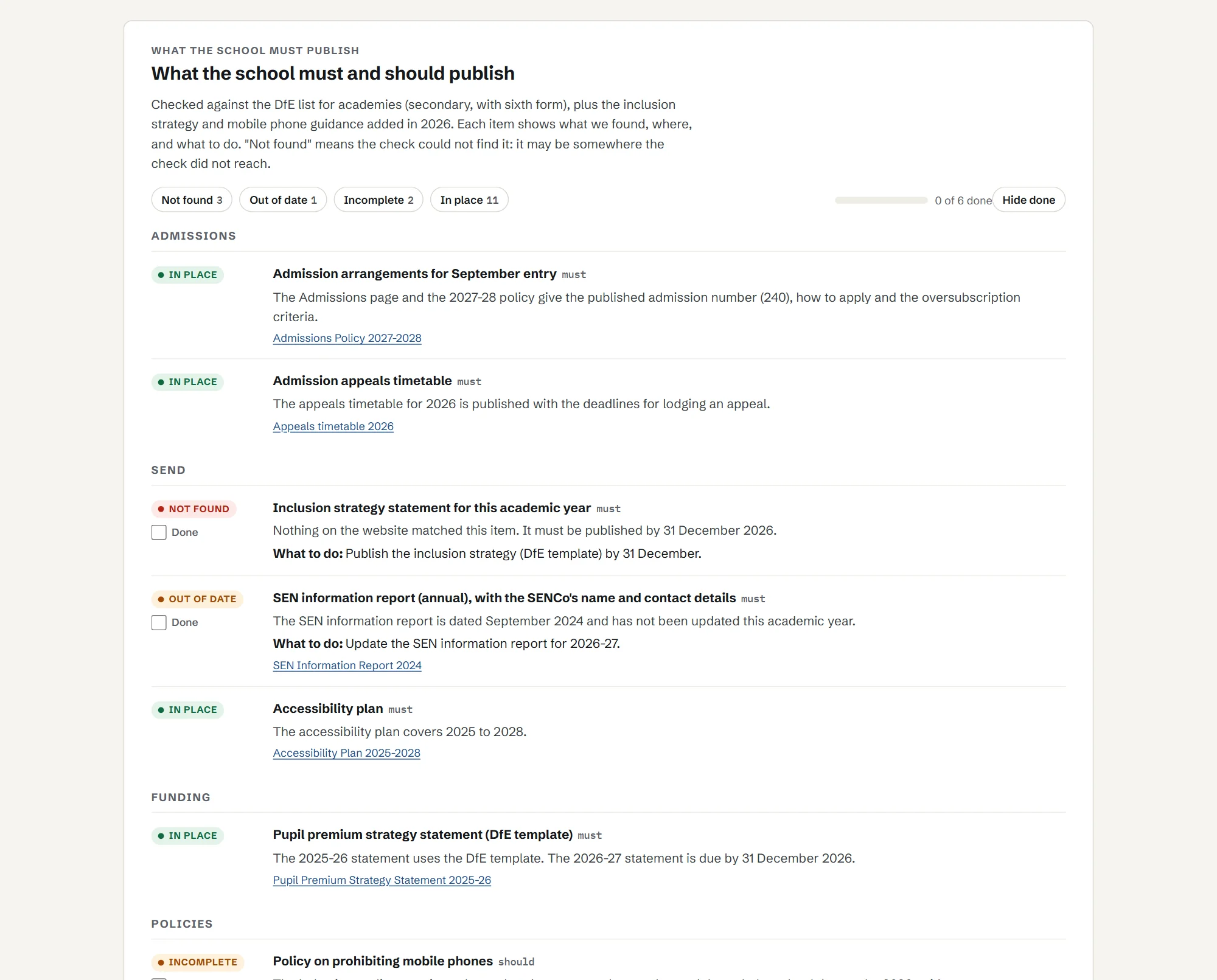
Is everything you must publish there, and up to date?
Schools must publish a long list of information online, and the list depends on the type of school. You tell School Checkup your school's type when you add it (maintained school, academy or free school, primary or secondary). It then looks for each item on the DfE list for that type: found, not found, or out of date. It also checks:
- documents that no longer open;
- documents that are years out of date (old exam notices, old risk assessments, last decade's leaflets);
- dates that matter, such as the pupil premium statement each year and equality objectives every four years;
- accessibility basics on your main pages, and whether you have an accessibility statement;
- newer items from outside the DfE lists: the mobile phone policy and the inclusion strategy statement.
The lists come from the DfE's own guidance: What maintained schools must publish online and What academies, free schools and colleges should publish online.
Want the list itself, in plain English? Read our guide to what schools must publish online, with what academies must publish and the dates that matter.
What “not found” means
Not found means we could not find it in the pages and documents we read, not that it does not exist. It may be behind a login, in a document with an unclear name, or on your trust's website. Check it, then tick it off in the report.
Monthly, with reminders
Full Checkup checks your publishing every month, with reminders before the dates that matter, such as the pupil premium statement by 31 December. New for 2026/27? Read what changed this year.
What it picks up
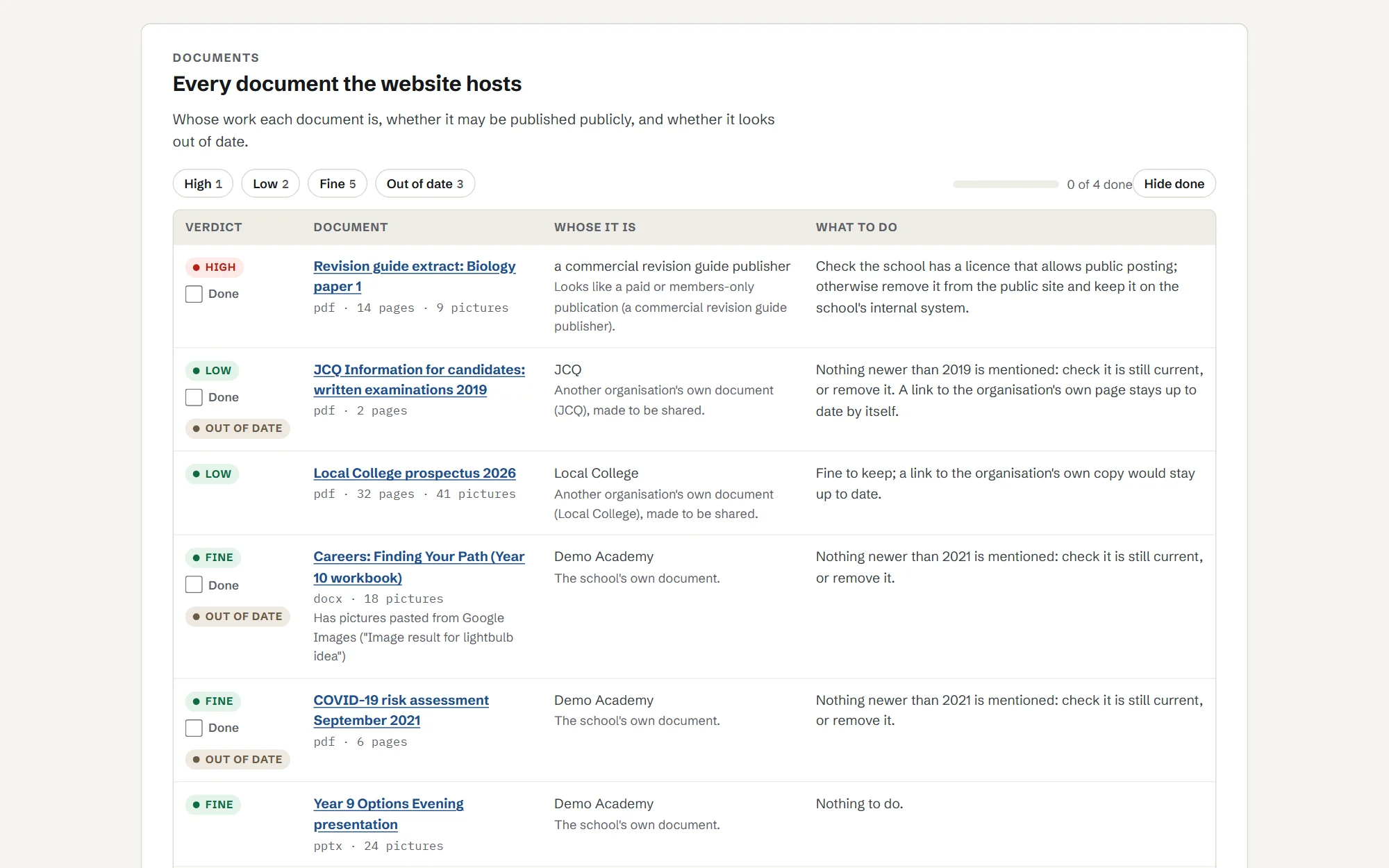
Real finds from one school website: the kind of thing that ends in a claim letter or a complaint.
- Pictures taken from companies, inside knowledge organisers made by staff.
- Pictures copied from search results, with "Image result for..." still in the file.
- Documents years out of date, including a 2010 exam leaflet and a 2022 COVID risk assessment.
- documents opened and read
- 265
- still carrying "Image result for..." text from pictures copied from search results
- 9
See a report
Click through a sample report for Demo Academy, a made-up school, or download the PDF a school would keep for governors. It shows all three checks.
Plans and prices
Start with a free check. Then Link Watch or Full Checkup, paid yearly.
Free check
£0
A headline for your site: how many outside links need attention, how many statutory items we could not find, and how many pictures name a stock library in their own files.
Link Watch
£95a year
Link safety in full, re-checked every month, an email the day a link turns bad, and a dated PDF each term for your safeguarding records.
Full Checkup
£195a year
Everything in Link Watch, plus website publishing (monthly, with reminders before dates that matter) and the picture rights register once a year. Extra picture checks are £25 each.
Primary schools
£75a year
Full Checkup, at a price for smaller sites.
Trusts (3 or more schools)
£75 Link Watch or £150 Full Checkup, per school a year. Primaries £65.
The same plans for every school in the trust, with one invoice and a trust view.
Paid plans open soon. Start with the free check now; we will email you when they do.
Forge Class is not VAT registered, so these are the full prices.
Pay by card or invoice. Purchase orders welcome.
What it cannot do
- It cannot prove a licence or permission. It tells you what to check.
- It cannot see pages behind a login, or content that only appears after clicking.
- It checks against the DfE lists as they stand; it does not give legal advice.
- New spam wording can slip past the term lists until it is added; anything odd is marked "check" rather than passed.
Questions
Does it know the 2026/27 changes?
It looks for the mobile phone policy (statutory guidance from September 2026) and the inclusion strategy statement (due by 31 December 2026 for schools getting the Inclusive Mainstream Fund). It also looks for the allergy safety policy, a new legal duty for every school. For a multi-academy trust's own website (choose it under “Type of school”), it checks the trust-level items, including the summary statement of how funds are distributed, first due by 31 January 2027.
What does "not found" mean?
It means we could not find it in the pages and documents we read, not that it does not exist. It may be behind a login, in a document with an unclear name, or on another website.
What if an item is on our trust's website, not the school's?
Some items belong on the trust's website, such as the trust's accounts and governance documents. If an item is only there, link to it from the school's own site so parents can find it. If the check marks it not found, look on the trust's site and tick it off once you have.
Does it cover Wales, Scotland or Northern Ireland?
The link and picture checks work anywhere. The publishing checklist follows the DfE lists for schools in England.
How is this different from our website provider's checks?
Website providers check that their platform works. School Checkup checks what is published on it: where every link goes now, whether each required item is there, and where your pictures came from.
How do we get the results?
By email when the check finishes (just the headline numbers and a sign-in link), then in your own report online: a "do these first" list, each check in detail, tick boxes to mark things done, a print layout to save as a PDF, and a read-only link you can share with governors or your website provider.
Also in School Checkup
- 01
Link safety
Every outside link opened once, the way a pupil's browser would, with what the site used to be and what it is now.
More on link safety - 03
Picture rights
A register of every distinct picture on your pages and in your documents, with a reverse image search for stock library pictures.
More on picture rights
See what your school website is missing. The first check is free.