Find unsafe and hijacked links on your school website
Find old links on your school website that now lead to casino, adult or scam sites, plus broken links. Every outside link opened, with then-and-now evidence.
Free check, then from £75 a year. Card or invoice.
Why it matters
- Headteachers and DSLs
- A pupil following a link on the school's own site to a casino or adult site. Keeping children safe in education (KCSIE) lists online gambling among the online risks to safeguard pupils from.
- Network managers and website editors
- A fix list they can work through, with the exact page and link.
- Trust central teams
- Every school's website at once, one invoice. Link safety across a trust
What School Checkup does
Old links that now lead somewhere they shouldn't
School websites collect links over many years: to charities, revision sites, councils and clubs. When one of those organisations closes or lets its web address lapse, someone else can buy the address. Some buyers keep the old name and put a casino, a pharmacy-spam shop or worse behind it. The link on your site still says “Revision help” or “Volunteering”.
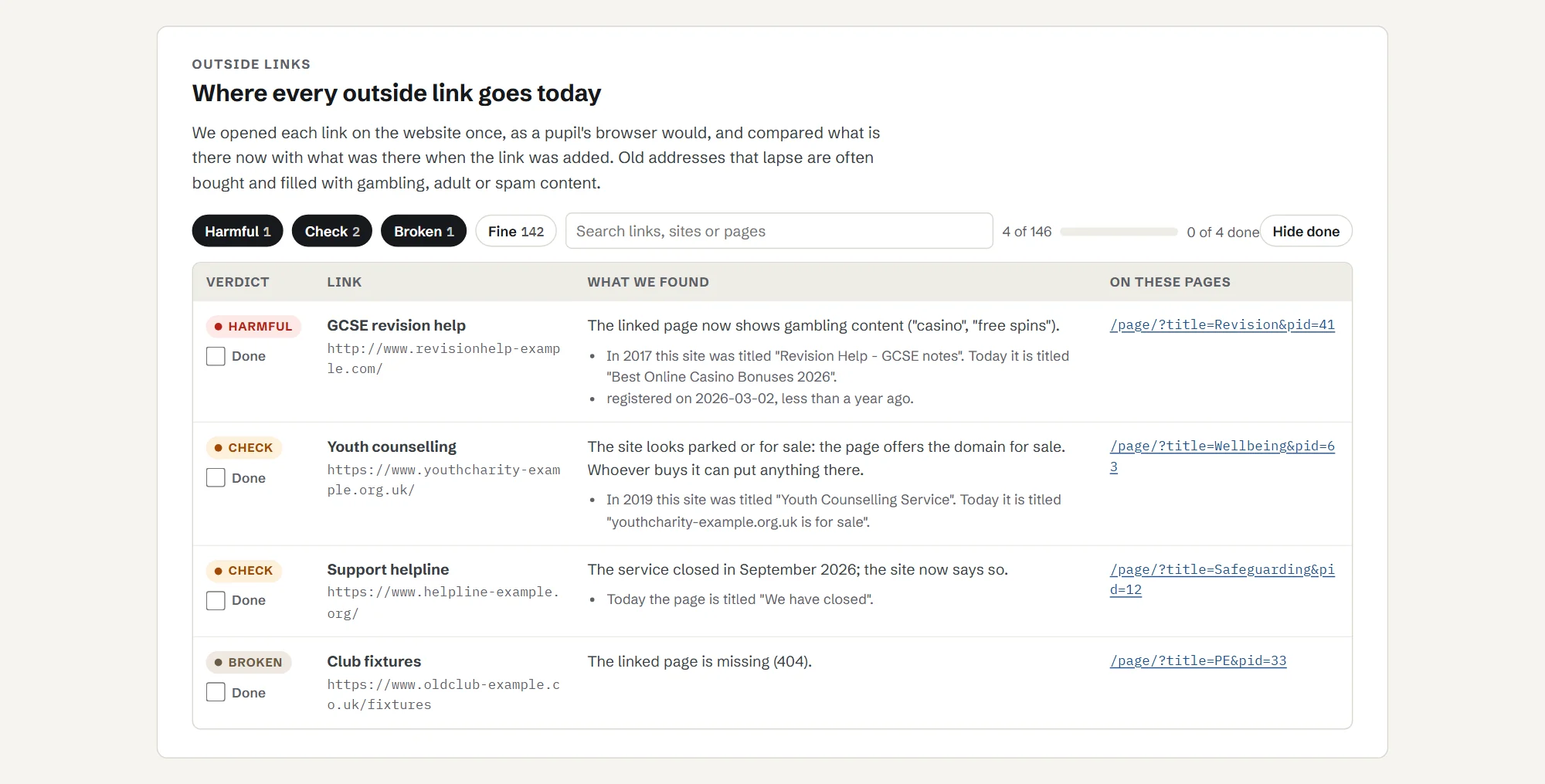
School Checkup opens every outside link on your site once, the way a pupil's browser would. It compares what the site is now with what it used to be, checks when the address was last registered, and flags:
- links that now lead to gambling, adult, pharmacy-spam or essay-writing sites;
- links to sites that are parked, for sale or have changed hands;
- broken links and links that redirect somewhere new.
Each flagged link shows the page it is on, the link text, what the site used to be and what it is now.
Real examples, as seen in 2026
Addresses that had been genuine, school-friendly sites and now are not. They are shown as text here, not links. This is what each address led to when we saw it in 2026; addresses can change hands again.
| Address | What it was | What it led to, as seen in 2026 |
|---|---|---|
| do-it.org | A volunteering site | Redirects to a casino site registered in March 2026 |
| harvardgenerator.com | A referencing generator | Pharmacy spam |
| sowieso.de | A German children's news site | A casino comparison site |
| rsrevision.com | An RS revision site | A casino |
Why it is a safeguarding question
Keeping children safe in education 2026 says “it is essential that children are safeguarded from potentially harmful and inappropriate online material” (paragraph 164). It sorts online risks into four areas: content, contact, conduct and commerce, and commerce includes “online gambling, inappropriate advertising, phishing and or financial scams” (paragraph 165).
A hijacked link on a school's own website points pupils straight at that kind of site, with the school's name on the link. School filtering works on the school's network and devices; a pupil who follows the same link at home, on a phone or a family laptop, is often outside it.
Source: Keeping children safe in education 2026, on gov.uk, in force from 1 September 2026.
Broken links and links that redirect
The same check lists broken links (the page has gone, or the site no longer answers) and links that now redirect somewhere new. A broken link is not a safeguarding problem, but it makes a site look neglected, and a redirect can be the first sign that an address has changed hands. Each one shows the page it is on, so it can be fixed or removed.
Link Watch, £95 a year
Link safety in full, re-checked every month, an email the day a link turns bad, and a dated PDF each term for your safeguarding records.
The checker reads public pages only and never keeps your documents. How School Checkup handles your data
When a link turns bad
What to do when a link turns bad
Whether School Checkup finds it, a parent emails or you spot it yourself, the steps are the same.
- 01
Take the link down today. Remove it yourself or ask your website provider to. Do not wait for the next website update.
- 02
Record it. Note the page, the link text, where the link now leads and the dates you found and removed it, in the same place you record other online safety concerns.
- 03
Tell the DSL. If you are not the designated safeguarding lead, tell them the same day. They can decide whether anything more is needed.
- 04
Look for the same address elsewhere. Old newsletters, homework pages and PDFs often repeat a link. Your website provider can usually search the whole site for an address.
- 05
Think about who may have followed it. A link on a revision or homework page is more likely to have been used by pupils than one in an old newsletter. Treat it as you would any other online safety concern.
- 06
Check the other old links from the same time. If one organisation's address lapsed, links added in the same year may have aged in the same way.
Link Watch emails you the day a link turns bad and sends a dated PDF each term, so the record is kept for you. Your child protection policy should be public too: see what KCSIE says about publishing it.
See a report
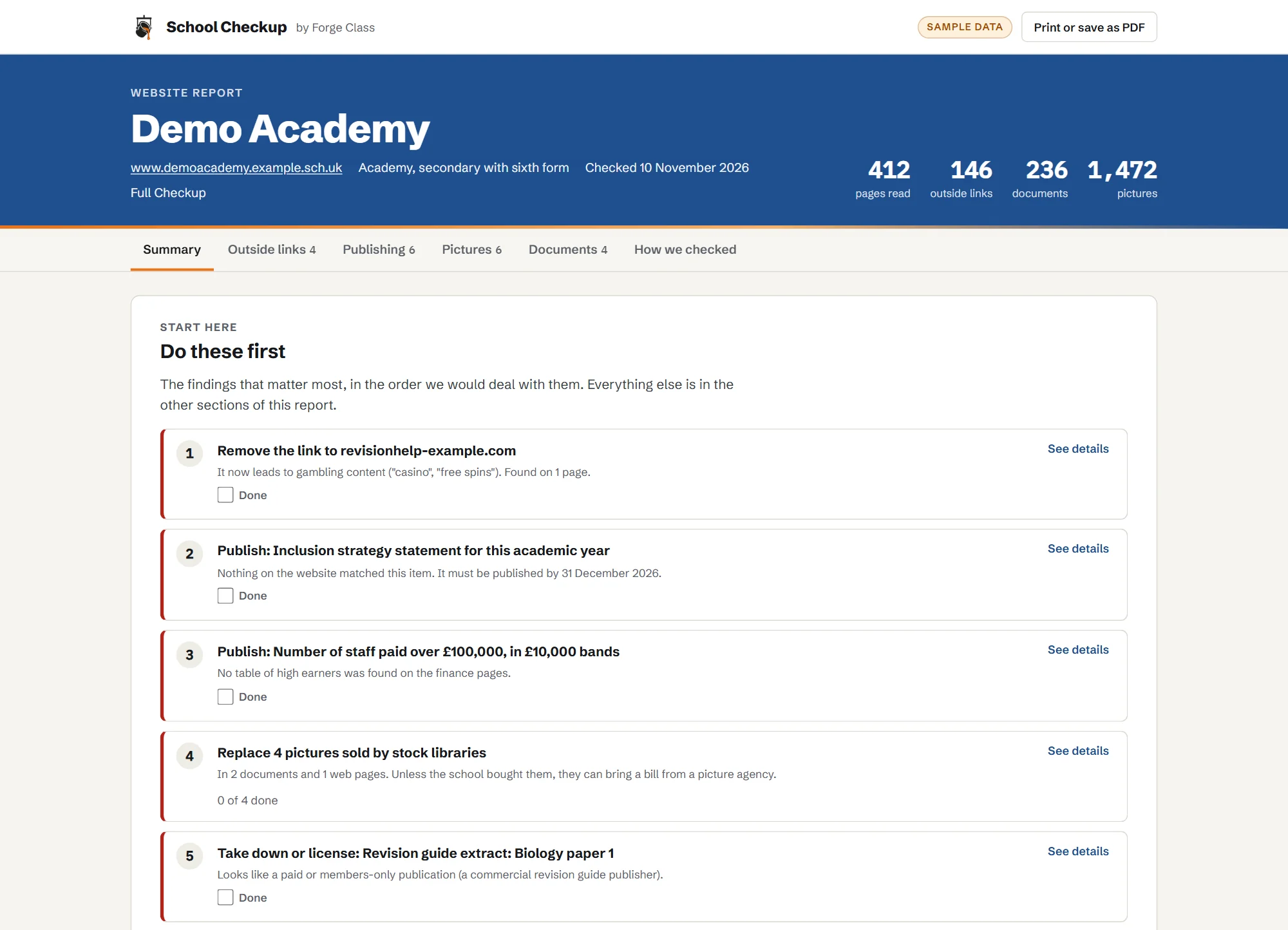
Click through a sample report for Demo Academy, a made-up school, or download the PDF a school would keep for governors. It shows all three checks.
Plans and prices
Start with a free check. Then Link Watch or Full Checkup, paid yearly.
Free check
£0
A headline for your site: how many outside links need attention, how many statutory items we could not find, and how many pictures name a stock library in their own files.
Link Watch
£95a year
Link safety in full, re-checked every month, an email the day a link turns bad, and a dated PDF each term for your safeguarding records.
Full Checkup
£195a year
Everything in Link Watch, plus website publishing (monthly, with reminders before dates that matter) and the picture rights register once a year. Extra picture checks are £25 each.
Primary schools
£75a year
Full Checkup, at a price for smaller sites.
Trusts (3 or more schools)
£75 Link Watch or £150 Full Checkup, per school a year. Primaries £65.
The same plans for every school in the trust, with one invoice and a trust view.
Paid plans open soon. Start with the free check now; we will email you when they do.
Forge Class is not VAT registered, so these are the full prices.
Pay by card or invoice. Purchase orders welcome.
What it cannot do
- It cannot prove a licence or permission. It tells you what to check.
- It cannot see pages behind a login, or content that only appears after clicking.
- It checks against the DfE lists as they stand; it does not give legal advice.
- New spam wording can slip past the term lists until it is added; anything odd is marked "check" rather than passed.
Questions
Why does a link on our website now go to a casino?
The organisation the link pointed to closed or let its web address lapse, and someone else bought the address. Some buyers keep the old name and put a casino, adult or scam site behind it, because old links from school websites bring visitors. The link on your page still says what it always said.
Does our school filtering protect pupils from links on our own website?
Only on the school's network and devices. A pupil or parent who follows the same link at home, on a phone or a family laptop, is often outside the school's filtering.
How often should we check the links on our school website?
No rule sets a frequency, and a link can change hands at any time, so check regularly. Link Watch re-checks every month and emails you the day a link turns bad (paid plans open soon). You can start with the free check.
What should a DSL do when a link turns bad?
Take the link down the same day, then record it: which page, what the link said, where it led and when you removed it. Check other pages and documents for the same address, and think about whether pupils are likely to have followed it. The steps are on this page.
Will it slow down or break our website?
No. It reads one page at a time at the speed your website asks robots to use, identifies itself, and only reads public pages.
Do you change anything on our site?
No. It only reads. You get a list of fixes; you or your website provider make them.
How is this different from our website provider's checks?
Website providers check that their platform works. School Checkup checks what is published on it: where every link goes now, whether each required item is there, and where your pictures came from.
How do we get the results?
By email when the check finishes (just the headline numbers and a sign-in link), then in your own report online: a "do these first" list, each check in detail, tick boxes to mark things done, a print layout to save as a PDF, and a read-only link you can share with governors or your website provider.
Also in School Checkup
- 02
Website publishing
Each item on the DfE list for your type of school: found, not found, or out of date. Plus documents that no longer open or are years old.
More on website publishing - 03
Picture rights
A register of every distinct picture on your pages and in your documents, with a reverse image search for stock library pictures.
More on picture rights
Find out where your school website's links lead today. The first check is free.